
Download Resetter Epson ET-8700 Gratis (Terbaru 2026) menjadi solusi praktis saat printer Epson EcoTank ET-8700 menampilkan error Service Required atau Ink Pad is at the end of its service life. Ketika notifikasi ini muncul, printer langsung berhenti mencetak meskipun tinta masih penuh dan tidak ada kerusakan fisik.
Masalah tersebut terjadi karena sistem penghitung limbah tinta (waste ink counter) telah mencapai batas maksimal. Sistem ini memang dirancang untuk menghentikan operasional printer sebagai langkah perlindungan. Namun, Anda tidak perlu panik. Dengan resetter terbaru 2026, Anda bisa mengembalikan printer ke kondisi normal hanya dalam beberapa menit.
Artikel ini membahas cara download, langkah reset, penyebab error, serta tips agar printer tidak cepat mengalami masalah serupa.
Download Resetter Epson ET-8700 Terbaru 2026 di Zentafile
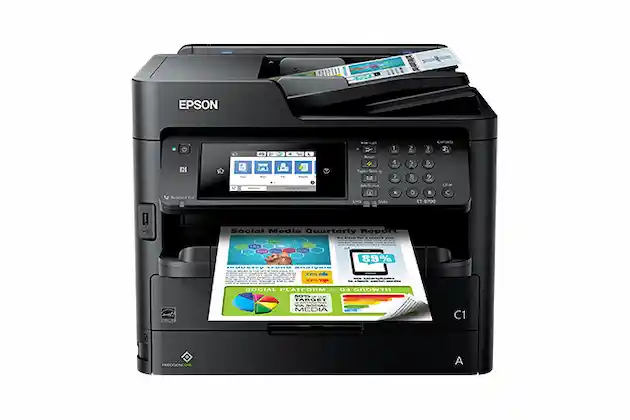
Versi resetter terbaru hadir dengan peningkatan stabilitas dan kompatibilitas sistem operasi terbaru. Selain itu, tampilannya lebih sederhana sehingga mudah digunakan, bahkan oleh pemula.
Fitur utama resetter 2026:
- Kompatibel Windows 7, 8, 10, dan 11
- Proses reset cepat dan stabil
- Ukuran file ringan
- Tidak memerlukan instalasi tambahan
- Antarmuka mudah dipahami
| Versi | |
|---|---|
| Sistem | Windows 7, 8, 10, 11 |
| Ukuran | 8 MB |
| Lisensi | Freeware |
| Pengembang | Seiko Epson |
| Link_developer | |
| Uploaded | 23 Februari 2026 |
Pastikan Anda mengunduh file dari sumber terpercaya agar terhindar dari file rusak atau tidak lengkap.
Cara Download Resetter Epson ET-8700
Agar proses berjalan lancar, ikuti langkah berikut:
- Nonaktifkan sementara antivirus atau Windows Defender.
- Klik tombol download resetter Epson ET-8700.
- Tunggu hingga file selesai diunduh.
- Ekstrak file menggunakan WinRAR atau 7-Zip.
- Buka folder hasil ekstrak tanpa mengubah struktur file.
Setelah itu, Anda bisa langsung menjalankan program resetter.
Cara Reset Epson ET-8700 dengan Resetter
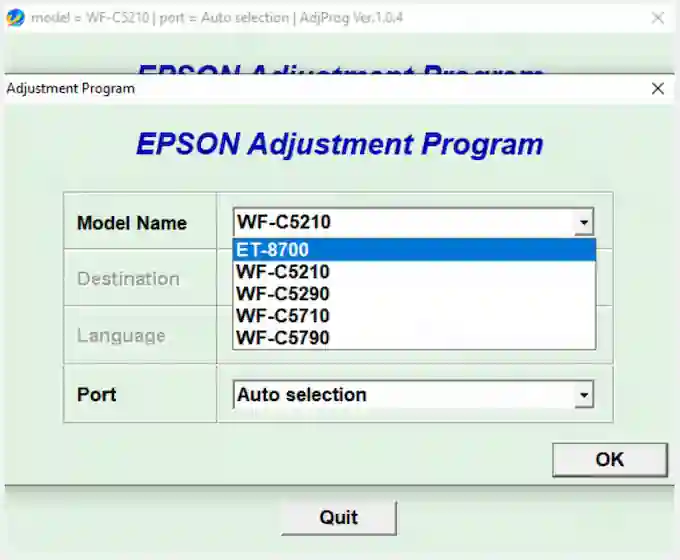
Setelah download resetter Epson ET-8700 gratis terbaru 2026 berhasil, lakukan reset dengan langkah berikut:
- Hubungkan printer ke PC menggunakan kabel USB.
- Nyalakan printer dalam kondisi standby.
- Klik kanan file AdjProg.exe, lalu pilih Run as Administrator.
- Klik tombol Select, kemudian pilih model ET-8700.
- Pilih menu Particular Adjustment Mode.
- Klik Waste Ink Pad Counter.
- Centang Main Pad Counter.
- Klik Check untuk melihat status counter.
- Tekan Initialize untuk memulai reset.
- Matikan printer saat diminta, lalu nyalakan kembali.
Jika proses berhasil, pesan error akan hilang dan printer dapat digunakan kembali.
Apa Itu Resetter Epson ET-8700?
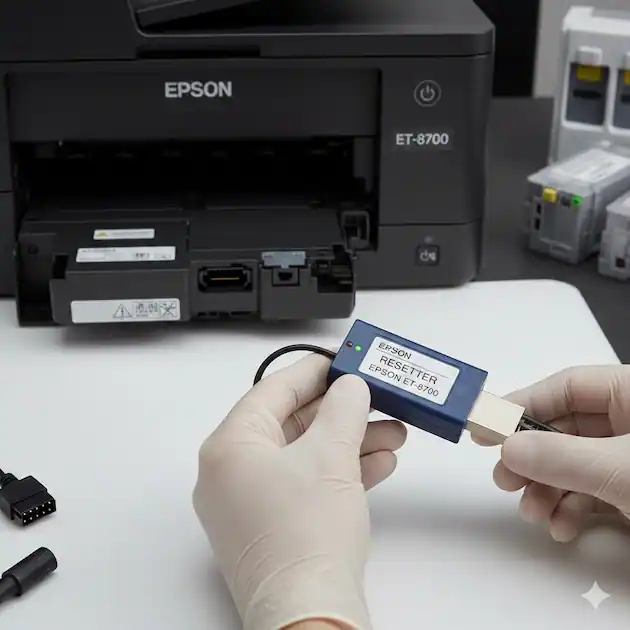
Resetter Epson ET-8700 merupakan software khusus yang berfungsi untuk mengatur ulang penghitung limbah tinta pada printer. Setiap kali printer melakukan cleaning head atau mencetak dokumen, sebagian tinta akan mengalir ke bantalan penampung limbah.
Printer menghitung jumlah tinta tersebut secara otomatis. Ketika angka mencapai batas tertentu, sistem akan memblokir fungsi cetak. Oleh karena itu, resetter dibutuhkan untuk mengembalikan angka ke nol.
Penyebab Error Service Required
Beberapa penyebab umum munculnya error pada Epson ET-8700 antara lain:
- Terlalu sering melakukan head cleaning
- Pemakaian intensif dalam jangka panjang
- Waste ink counter mencapai batas maksimum
- Printer jarang dimatikan dengan benar
Ketika kondisi ini terjadi, printer tidak merespons perintah cetak sampai Anda melakukan reset.
Apakah Reset Aman?
Proses reset aman dilakukan selama Anda mengikuti langkah dengan benar. Resetter hanya mengatur ulang sistem penghitung internal dan tidak merusak firmware printer.
Namun demikian, jika bantalan tinta sudah benar-benar penuh secara fisik, sebaiknya Anda membersihkan atau menggantinya untuk mencegah kebocoran tinta di kemudian hari.
Tips Agar Epson ET-8700 Tidak Cepat Error
Setelah reset berhasil, lakukan perawatan rutin agar printer tetap optimal:
- Hindari head cleaning berlebihan
- Gunakan tinta original atau berkualitas tinggi
- Gunakan printer secara rutin namun tidak berlebihan
- Bersihkan printer dari debu secara berkala
Dengan perawatan yang tepat, printer dapat bekerja lebih stabil dan jarang mengalami error waste ink pad.
Kelebihan Epson EcoTank ET-8700
Sebagai printer kelas bisnis, Epson ET-8700 memiliki banyak keunggulan:
- Sistem tangki tinta hemat biaya
- Kualitas cetak tajam dan profesional
- Mendukung cetak dua sisi otomatis
- Fitur scan, copy, dan fax lengkap
- Cocok untuk kebutuhan kantor dan usaha
Karena dirancang untuk volume cetak tinggi, printer ini memang lebih cepat mencapai batas waste ink counter dibanding printer rumahan biasa.
Kesimpulan
Download Resetter Epson ET-8700 Gratis (Terbaru 2026) adalah solusi cepat dan efektif untuk mengatasi error Service Required serta Ink Pad penuh. Dengan mengikuti panduan reset secara benar, Anda dapat menghemat biaya service dan mengembalikan printer ke kondisi normal dalam waktu singkat.
Lakukan perawatan rutin agar printer tetap awet dan bekerja optimal untuk mendukung kebutuhan cetak harian Anda.
The app installation was a breeze and the login process is super fast. It makes the whole experience much more convenient on mobile. superlgloginappapk
I love how the site looks and feels. It makes the whole gambling experience much more enjoyable. Definitely spending more time on okjilicasino
Great platform with very fair odds. I appreciate the transparency and the quick customer support. krikia11 is a winner.
This site is a hidden gem. The promotions are way better than the big name sites and the winning streaks are real. Check out inx666 for yourself.
Best mobile experience I’ve had in a long time. Everything is just a click away with 76nbetapp.
I’ve tried a few sites lately but this one is definitely the smoothest. The login process is super quick and I didn’t hit any lags. Highly recommend kk44login for anyone looking for a reliable spot.
Super easy setup and the game graphics are stunning. It is definitely the most stable version I have used. Check ck9999appdownloadapk!
If you are looking for a place with a huge selection of slots and great rewards then this is it. I am having a blast on brpgwin.
The most reliable way to access my account in the Philippines. The login is secure and the sports betting options are endless. Love it. Use 1xbetphilippineslogin
I really appreciate how easy it is to deposit and withdraw funds here. No hidden fees and no stress. 289betapp is my new go-to spot.
The betting options here are top notch. I feel much more confident playing on this site. Big shoutout to vn89bet9com for the great service!
Finally found a smooth way to get the app running. The installation was a breeze and everything works perfectly on my phone. Love 7u7appapk
Really impressed with the game variety here. Everything loads quickly and the bonuses are actually fair. Definitely my new favorite spot, brkk44 is a gem.
The promotions here are just insane. I love how they keep adding new events for the players. If you are looking for action go to vn123win01.